

redact-11-copy-check, after redact-10-offline
Why check the output, not just the input?
Every check so far looked at the original document. But what you share is the copy, and the copy is what matters. If you rejected a suggestion by mistake, or a field was never suggested, the copy still shows it, and nothing has told you. The fix is simple to say: read the copy the same way we read the original. The covered fields are black boxes, so OCR finds no text there. Anything private that OCR can still read, and Laya still flags, is exactly what you’d be leaking. Because Laya decides a page in under a second, this second pass is cheap; most of its time is OCR. And it stays a reminder, not a gate: you may have left the email visible on purpose. More on why the person keeps the final say: About Redact’s trust boundary.1. Get this lesson’s code
Stop the app and the service if they’re running. From the repository root,redact-course, bring in this lesson’s commit:
2. Keep the flattened pages
Opensrc/features/redact/safe-copy.ts.
The copy already painted each page into new pixels; now it also hands those pages back:
flattenedPages gives it exactly the pixels that went into the copy, page by page.
3. Read the copy back
Opensrc/features/redact/RedactApp.tsx and find checkCopy.
Right after the copy is made, Redact starts it without waiting:
checkCopy sends each flattened page through the same analysis as the original, with the same privacy level and direction:
checking, clear, found, or unavailable if the service can’t be reached.
If you go back to review or start a new document, copyCheckSequence moves on, so a late result from an old copy is ignored.
4. Show the result
Opensrc/features/redact/components/CompleteStage.tsx:
5. Wait instead of failing
The check uses the local service, which runs one analysis at a time. If you start the next document while a check is still running, the service is busy. Before, that showed “Local analyzer is busy”; now preparation waits:6. Start the service and the app
In one terminal:7. Leave one field visible on purpose
Open localhost:3101. Uploadpublic/test-files/redact/chat-private.png, choose Private, and type this direction:
8. Watch the check
The finished screen shows Checking the copy locally for anything still readable… for about 25 seconds. Then: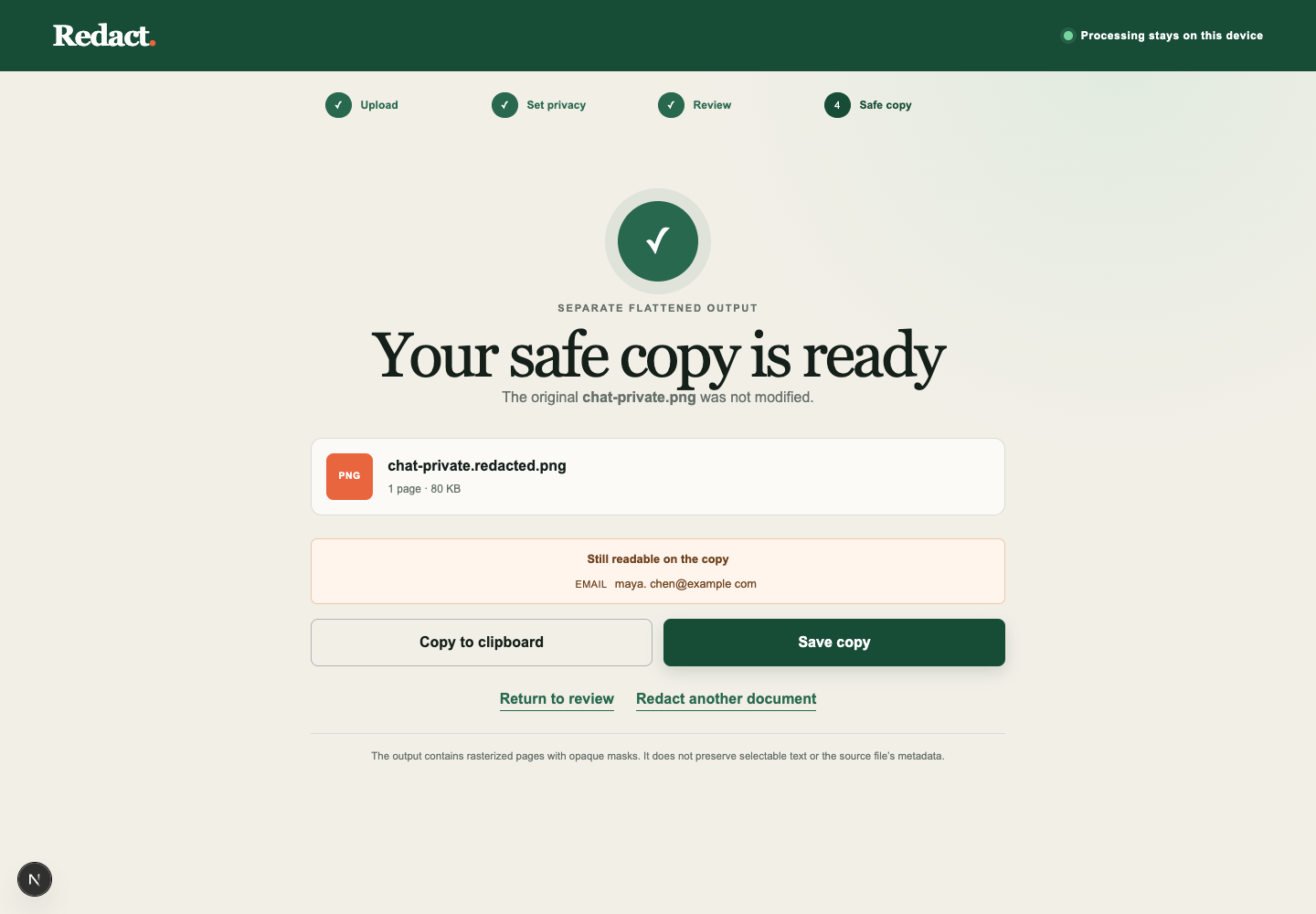 Still readable on the copy lists the email.
The covered fields are black boxes, so OCR found no text there; the email you rejected is still readable, so it’s listed.
Save copy stays enabled, because leaving the email visible was your decision.
9. Cover it and check again
Select Return to review. The EMAIL card still saysrejected, and it keeps an Accept button: select it.
The email is now covered; select Done again.
This time the check reads Local check: nothing private is readable on the copy.
Now select Redact another document and upload the chat again straight away.
If the check is still running, you’ll see Waiting for the previous local check to finish…, and analysis starts once the service is free.
If something goes wrong
- No check appears at all: the service isn’t running; start
npm run qvac:serviceand select Done again. - “Local analyzer is busy” after a minute: something else is using the service; wait for it to finish, then select Retry local analysis.
- The check lists a field you covered: your box doesn’t fully cover the text; return to review and resize the mark.
10. Check your work
Stop both terminals, then:npm test ends with Tests 87 passed (87).
So what just happened?
Redact now checks its own work. The same local OCR and Laya that suggested what to cover now read the copy before it leaves your machine. That catches the riskiest mistake, a field nobody covered, without taking the decision away from you.Try it yourself
Run the chat again and reject a different suggestion, such as the phone number, instead of the email. See whether the check catches it, and how the finding’s label and text compare with the suggestion you rejected.Where to next
- Every file at this checkpoint:
redact/atredact-11-copy-check - About Redact’s trust boundary and Decision questions